
A Hide My Email alternative built into your inbox
Want private email aliases without an Apple device or an iCloud+ subscription? Secria Mail has aliases built in. Mail to an alias lands in your own encrypted inbox instead of being forwarded somewhere else, and you can reply from it. Free on Android, iPhone and the web.
- 2 aliases free, no card
- Android, iPhone and web
- Reply from any alias
Why people look beyond Hide My Email
Hide My Email hides your address. Then it forwards the mail.
How Apple describes it in its own iCloud User Guide.
Mail ends up in another inbox
Apple forwards mail sent to your random addresses to your iCloud Mail address or another address on your Apple Account.1 If that is a Gmail or Outlook address, your mail sits there.
That inbox isn’t end-to-end encrypted
If it forwards to iCloud Mail, Apple says iCloud Mail is not end-to-end encrypted, even with Advanced Data Protection.2
It needs iCloud+
Apple’s setup guide ties Hide My Email to an iCloud+ subscription, yours or your Family Sharing group’s, plus two-factor authentication on your Apple Account.3
Android means the browser
Outside Apple devices, Apple points you to iCloud.com in a web browser to manage your addresses.1
How Secria aliases work
An alias that is part of your mailbox, not a relay in front of it
Create an alias
Make a new address in seconds for a shop, a newsletter or a sign-up form. Give it a display name if you like.
Mail lands in your inbox
Messages to the alias arrive in your Secria inbox, sealed with your keys like everything else. All your aliases are managed from one page.
Reply, or retire it
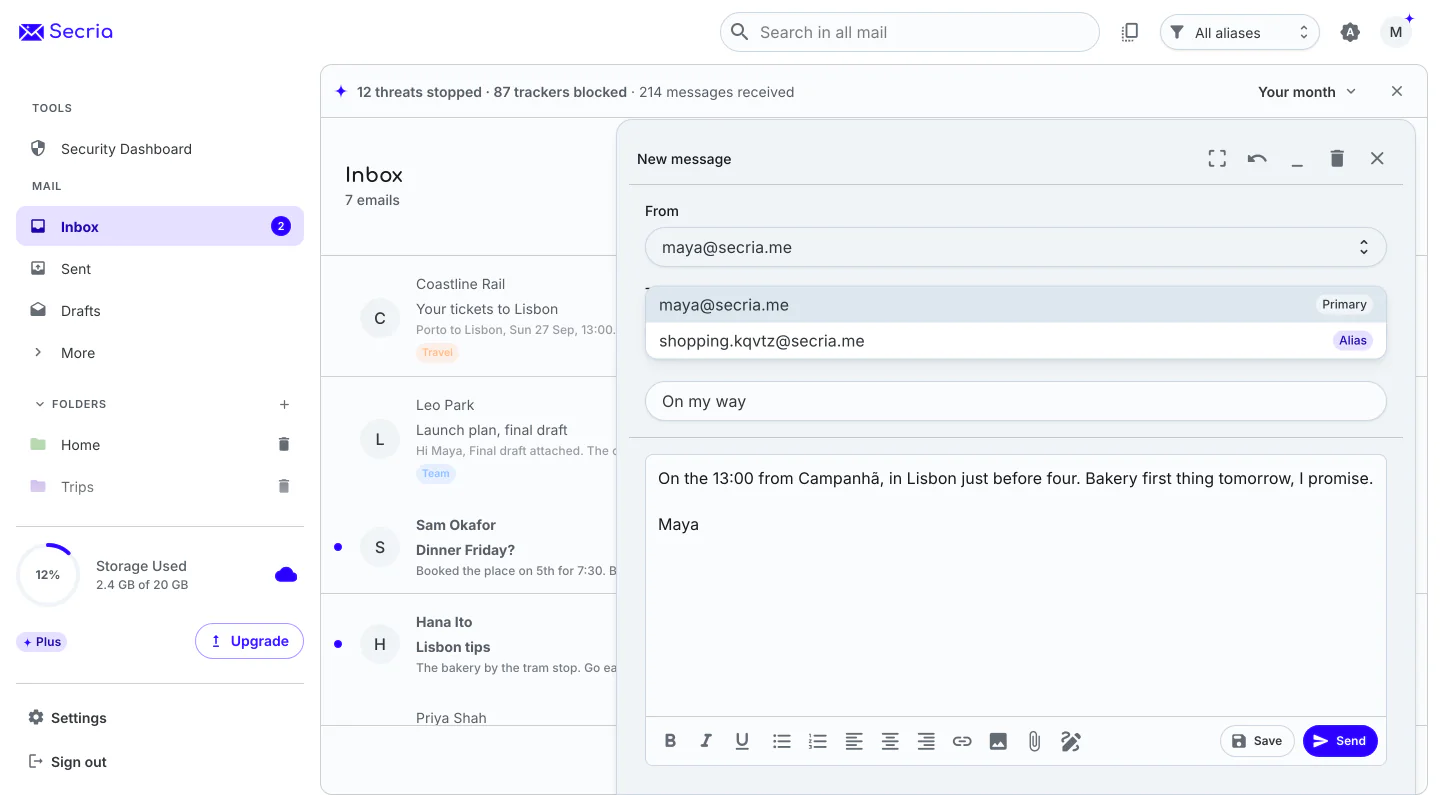
Reply from the alias so your main address stays private. If it starts getting spam, delete it or regenerate a fresh one.
Hide My Email vs Secria aliases
Where your alias mail ends up matters most
Every Hide My Email cell links to Apple’s own documentation.
| Question | Hide My Email | Secria aliases |
|---|---|---|
| Where alias mail goes | Forwarded to your iCloud Mail or another address on your Apple Account.1 | Straight into your Secria inbox. No forwarding. |
| How that mail is stored | In iCloud Mail, not end-to-end encrypted.2 Elsewhere, up to that provider. | Sealed with your keys, with post-quantum ML-KEM-1024 and X25519. |
| What you need to start | An iCloud+ subscription and two-factor authentication.3 | A free Secria account. No card, no phone number. |
| Android | iCloud.com in a web browser.1 | A native Android app. |
- Apple, What you can do with iCloud+ and Hide My Email (iCloud User Guide).
- Apple, iCloud data security overview (Apple Support).
- Apple, Set up Hide My Email (iCloud User Guide).
Checked October 2026. Secria facts are from our Mail page and pricing page.
More than aliases
The inbox your aliases deliver to
Trackers removed
Tracking pixels are removed automatically and images load through our proxy, so the shops behind your aliases never see your IP address.
Your own domain
On Mail Plus and Pro, create aliases on your own domain and set a catch-all address.
No ads, no profiling
Nothing in your inbox is read to sell you things, on any plan.
Aliases on every plan
Same encryption on every plan. More aliases as you grow.

Mail Plus
20 GB, 15 aliases, 3 custom domains, unlimited folders, breach alerts.

Secria Pro
500 GB, unlimited aliases, 10 custom domains, and the full Secria VPN on 5 devices.
Monthly prices shown. Yearly and 2-year plans cost less per month. Compare all plans
30-day money-back on plans bought here. App Store and Google Play purchases follow their own refund rules.
Questions about Hide My Email alternatives
Can I use Hide My Email on Android?
Apple says Hide My Email is available on iCloud.com from any supported web browser, so on Android you manage it in the browser. Secria aliases live in the Secria Mail app for Android and iPhone, and on the web.
Can I use Hide My Email without iCloud+?
Apple’s setup guide says you can use Hide My Email if you or someone in your Family Sharing group has an iCloud+ subscription, and you need two-factor authentication on your Apple Account. Secria’s free plan includes 2 aliases with no card required.
Where does mail sent to an alias go?
With Hide My Email, Apple forwards it to your iCloud Mail address or another address on your Apple Account. With Secria, there is no forwarding: mail to an alias lands straight in your Secria inbox, sealed with your keys.
Can I reply from a Secria alias?
Yes. Pick the alias in the From field, and replies to mail sent to an alias go out from that alias automatically. Your main address stays private.
How many aliases do I get with Secria?
2 on the free plan, 15 on Mail Plus and unlimited on Secria Pro. On paid plans you can also create aliases on your own domain.
What happens if an alias starts getting spam?
Delete it, or regenerate it to get a fresh address. Mail to the old one stops reaching you.
Aliases that don’t forward your mail anywhere.
Start with 2 free. Unlimited on Secria Pro.
Explore Secria MailDownload on the App StoreGet it on Google Play